Chapter 2011 min read
Group routing strategies
Learn about the four routing strategies for provider groups and the default Price priority strategy, change a group's routing strategy, and learn how the gateway retries and switches provider keys after a request fails.
The routing strategy decides the order in which the gateway picks provider keys within a provider group. Each group has its own routing strategy, which you change on the group’s Settings tab. This page is for organization admins.
Warning: New provider groups use Price priority by default, which schedules by cost first. Under Price priority, TTFT priority, and Success rate priority, the Priority and Weight that you set on provider keys have no effect. To set a primary and backup order by priority and weight, change the group’s routing strategy to Manual.
The four routing strategies#
- Price priority (default): Prefers keys with a low effective price, then considers failure rate, expected duration, and caching. Suits cost-sensitive use cases.
- TTFT priority: Prefers keys with a short expected duration, then considers failure rate, caching, and price. The expected duration is the time to first token (TTFT) plus the time to generate the response, and it includes time wasted on failures. Suits interactive use such as Claude Code.
- Success rate priority: Prefers keys with a low failure rate, then considers caching and expected duration, and finally price. Suits use cases where stability matters more.
- Manual: Tries keys in order of the Priority you set on each key, and within the same priority distributes requests randomly in proportion to Weight. Suits a fixed primary and backup order, for example using the official channel first and a relay service only after it fails.
Change a group’s routing strategy#
Open the group#
In the sidebar, select Org management → Provider Management, click the Provider groups tab, and then click Edit in the group’s row.
Choose a routing strategy#
Click the Settings tab, and then click an option in Routing strategy.
Save#
Click Save at the bottom of the page.
Result: The Routing strategy column of the group list shows the new strategy, and new requests from then on are scheduled with the new strategy.
When you create a group, click New group and choose directly in Routing strategy. Price priority is selected by default. Groups imported from CC Hub use Manual and keep their original priorities and weights.
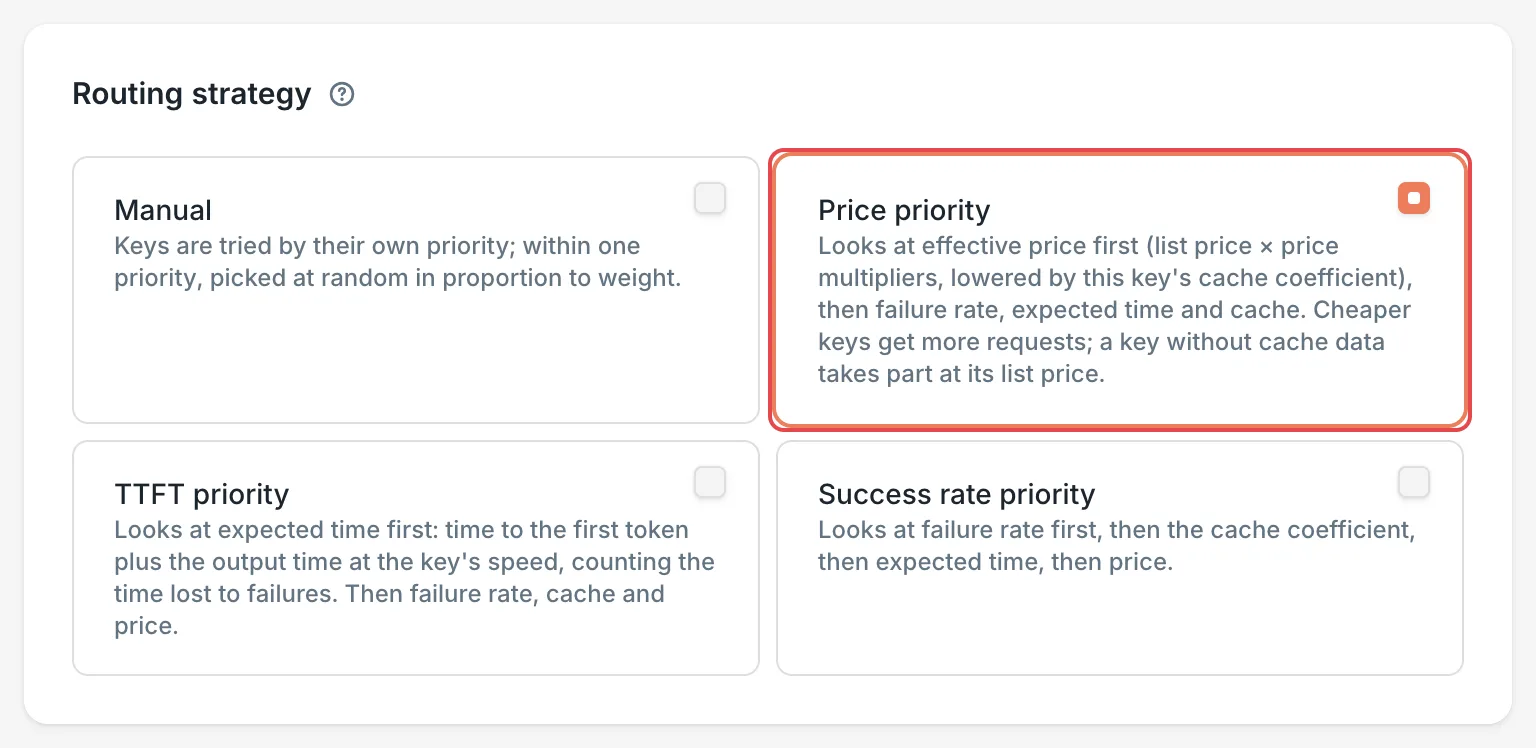 New provider group: the default routing strategy
 CCHP
CCHP
How the strategies pick keys#
Automatic strategies#
Price priority, TTFT priority, and Success rate priority are automatic strategies. They read the same real-time statistics for each key, and differ only in which factor they look at first.
- They don’t use only the single best key: the more likely a key is to be the best, the more requests it gets. The other keys also keep a small share of requests, so the gateway can find out whether they have recovered.
- Effective price = the model’s price in the price list × the key’s effective multiplier (the key’s Cost multiplier × the provider’s Top-up ratio), then discounted according to the key’s cache hits. When the price list has no price for the model, the comparison uses the average price of the other keys in the group. These multipliers are used only for routing and cost tracking, and don’t count toward the user’s bill. See Provider cost multipliers vs. user billing multipliers.
- The statistics update every 10 to 60 seconds. A key that just joined the group and has no data yet starts at the group’s average.
- When the number of requests a key is handling at the same time reaches the limit that the gateway determines from overload errors and response latency, the key temporarily moves behind the other keys.
Manual strategy#
The Manual strategy uses the Priority and Weight on each provider key:
- The gateway first chooses among the keys in the tier with the lowest Priority value. It uses the next tier only after all keys in this tier fail or are unavailable.
- Within a tier, requests are distributed randomly in proportion to Weight, with small adjustments for each key’s health and current concurrency. Health is tracked separately per organization and per request type: failures of image requests lower only the key’s health for image requests, and chat requests are not affected.
For the ranges, the defaults, and how to change these two values, see Provider keys.
Rules that all strategies follow#
- Same-protocol passthrough first: Off by default. While it is off, candidates that use the same request format as the client’s request and can be forwarded as is are sorted together with candidates that need protocol conversion, by group order and routing strategy. When a platform super admin turns on Same-protocol passthrough first in System Management → Routing → Routing Features (it can also be set separately for scopes such as an organization), candidates that can be forwarded as is come first in each group, candidates that need conversion are tried only after all of those are unavailable or fail, and the routing strategy sorts within each of the two kinds.
- Candidates of another endpoint type come last: Candidates whose endpoint type differs from the request (for example, an embedding request sent to a conversation endpoint) always come after all candidates of the request’s endpoint type, whatever the switch says, and are used only when those are all unavailable or fail. The decision chain records why.
- Conversation affinity: Later requests in the same conversation go first to the key that was used last time, as long as it’s still available.
- Paused keys are skipped: Keys that the upstream rate-limited or rejected, that were temporarily removed after consecutive failures, or that are disabled, aren’t picked until they recover. See Provider keys.
Where model redirects take effect#
Model redirects (the Model redirect preset in Request/Response Overrides, and rules with a model rewrite action) fall into two kinds, depending on where they are set:
- Redirects set globally or on an organization, team, catalog model, provider group, user, or LLM key run before the gateway looks up candidate keys. The rewritten model is the model used for routing: the provider keys’ Model whitelist, the group’s model rules, conversation stickiness, routing strategy statistics, and the decision chain all go by it. A redirect on a provider group takes effect only inside that group.
- Redirects set on a provider, provider key, model whitelist rule, or endpoint run after a key has been picked, and only rewrite the model name sent upstream. See Model redirects in Provider keys.
So when a key’s whitelist in the group has only the original model name and not the redirected model, the key is no longer a candidate in that group, and the decision chain records The key’s group routes another model. Add the redirected model to the whitelist, or set the redirect on the provider or the provider key instead.
At the positions that run before the lookup, redirect rules whose conditions or values use candidate information (provider, provider key, endpoint, session ID, and so on) cannot be saved. In the model resolution of the request details’ Decision chain, each redirect before a lookup is listed as Redirect before lookup, with its source and group.
What the gateway does after a request fails#
For each request, the gateway lines up a list of candidates (combinations of a provider key and an endpoint), and then tries them in order:
- Retry once: When the upstream returns a 5xx or the request times out, the gateway waits briefly and tries the same candidate once more. When the connection fails, the gateway switches to the next candidate right away if there is one. Otherwise, it tries the same candidate once more.
- Move to the next candidate: When the retry still fails, or the upstream returns another 4xx error (for example, an invalid key or insufficient balance), the gateway moves to the next candidate. Under the automatic strategies, the next candidate is picked from the remaining keys in the same way.
- Move to the next group: The gateway tries the LLM key’s next group only after all candidates in the current group fail or are unavailable. The LLM key’s routing strategy decides the order of the groups: Pinned groups follows the order the user arranged, and Price intent goes from the lowest billing multiplier to the highest. See Create an LLM key.
In addition:
- When the upstream rate-limits the key (429), rejects the key, or requires payment, the key is paused for a while and the gateway moves straight to the next candidate.
- Once the gateway starts sending response content to the client, it no longer retries or switches.
- A platform super admin can turn on End the request without trying other providers for a kind of upstream error in System Management → Error Rules. A request that matches such a rule tries no other candidates and returns that error to the client right away.
- Provider race: When a request that calls the upstream with streaming (chat requests do this by default) receives no content within the First content timeout (60 seconds by default), the gateway keeps that request open and also sends a request to the next candidate. Whichever returns content first is passed to the client, and the other requests are canceled. Upstream usage that the canceled requests already incurred is billed as usual. You can set the First content timeout separately on a provider or a provider key.
- Attempts are capped: in the Fallback card on the group’s Settings tab, the Global part has Max upstream calls per request (
10by default, including retries) and Max retry time per request (seconds) (315by default). When either limit is reached, or all candidates are used up, the request fails and the client receives the error from the last failed attempt.
Switch to other models (fallback)#
When requests for the original model fail, a group can also have the gateway keep trying with other models. On the Settings tab of a saved group, find the Fallback card:
- General fallback: Turn on Enable general fallback and add fallback models. After all candidates for the original model fail, the gateway switches to the fallback models in list order.
- Context fallback: Turn on Enable context fallback and add models, usually models with a larger context window. When the upstream returns a context-length-exceeded error, the gateway retries with the models in the list.
- Both kinds of fallback share Max model switches in the Global part (
3by default).
After you make changes, click Save at the bottom of the page.
View scheduling results#
- Keys in a group: On the Keys tab of the group details, the Schedulable column shows whether each key can be picked right now. When the group uses an automatic strategy, the Chance of being picked column shows the share of requests each key is expected to get, and you can click the key’s row to see its First pick probability for each model in the details panel. For what each column means, see Provider groups.
- A single request: In the sidebar, click Call Records (Usage Records in a platform super admin’s sidebar), click a request, and then click the Decision chain tab to see how the candidates were filtered and sorted, and the result of each attempt.
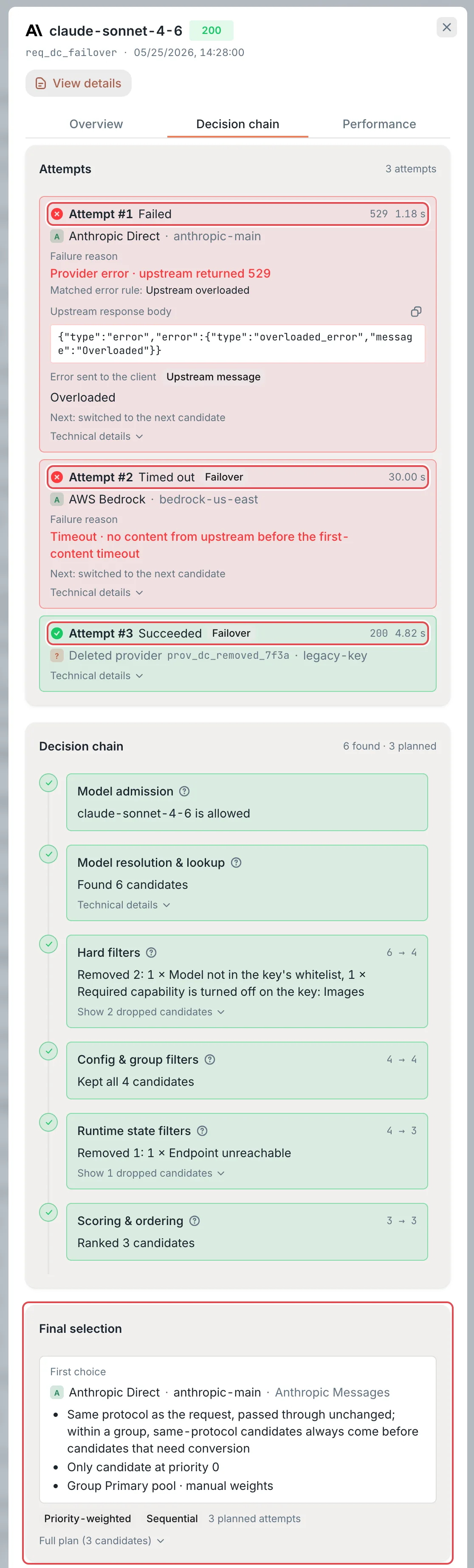 Request details: the Decision chain tabCCHP
Requests that don’t go through a group#
LLM keys that show No group restriction on API Keys don’t use groups. Their requests pick directly from the organization’s provider keys and are scheduled by the system-level routing strategy. Creating an LLM key in the console requires at least one group, so keys like these usually come from the management API or a CC Hub import.
A platform super admin changes the system-level routing strategy in Administration → System Management → Routing → Routing Features, under Routing strategy in the Routing card. The default is Price priority. Its four options map one to one to the group strategies: Manual priority (that is, Manual), Speed first (that is, TTFT priority), Success rate first, and Price priority. Effective scope at the top of the page is Global by default. To apply the setting to only one organization, first select that organization in Effective scope. This setting doesn’t affect provider groups, which always use their own routing strategies.
Frequently asked questions#
Why are more expensive keys still used when I chose Price priority?#
Price priority gives cheaper keys more requests, but not all of them:
- Every key keeps a small share of requests, so the gateway can find out whether it has recovered.
- Besides price, the strategy also considers failure rate, expected duration, and caching, so a cheap key with a high failure rate gets fewer requests.
- With Same-protocol passthrough first on, keys that can forward requests as is come before keys that need protocol conversion, even when the latter are cheaper.
- Ongoing conversations go back to the key they used before.
- When a cheap key is paused by rate limiting or reaches its concurrency limit, requests use other keys.
I changed the priority, so why didn’t the scheduling order change?#
First, make sure the group’s routing strategy is Manual. The other three strategies don’t use priority and weight. Second, ongoing conversations go back to the key they used before, and only new conversations follow the new order completely.