Chapter 223 min read
Operations settings
Learn about the operations features that a platform super admin configures for the whole platform, including online payments, packages, redeem codes, third-party sign-in, content moderation, upstream balances, and management API tokens for external systems.
This section covers the operations features that a platform super admin configures for the whole platform: how users top up online, buy packages, and use redeem codes, which sign-in methods the login page offers, how the gateway moderates request content, and how to fetch upstream balances and ratios automatically.
These settings are in the Administration menu in the sidebar, which only a platform super admin can see:
- Operations Settings: payment channels, packages, redeem codes, and engagement activities such as check-ins, referrals, and announcements.
- Sign-in Methods: sign-in policies such as registration and two-step verification, and third-party sign-in on the login page.
- System Management: its Prompt Safety & Content Moderation and Upstream Ratios & Balances tabs.
Management API tokens are not in the Administration menu. You create them in Account & Security → Management API tokens.
Choose a feature to configure#
The Operations Settings page#
In Administration → Operations Settings, the left side of the page lists the sections. To configure Payments, Packages, and Redeem Codes, see the matching pages above. The Client Detection section identifies the clients that call CCHP, such as Claude Code, by their request headers. The results are used by Client restriction and the client leaderboard.
The Activities, Referral Reward, Compensation & Clawback, and Announcements sections are for user engagement. To configure them, see these pages:
By default, these settings apply to the whole platform. For Packages, Referral Reward, and Activities, you can also select an organization or team in Scope at the top right and give it its own settings. Organizations and teams without their own settings use the Global settings.
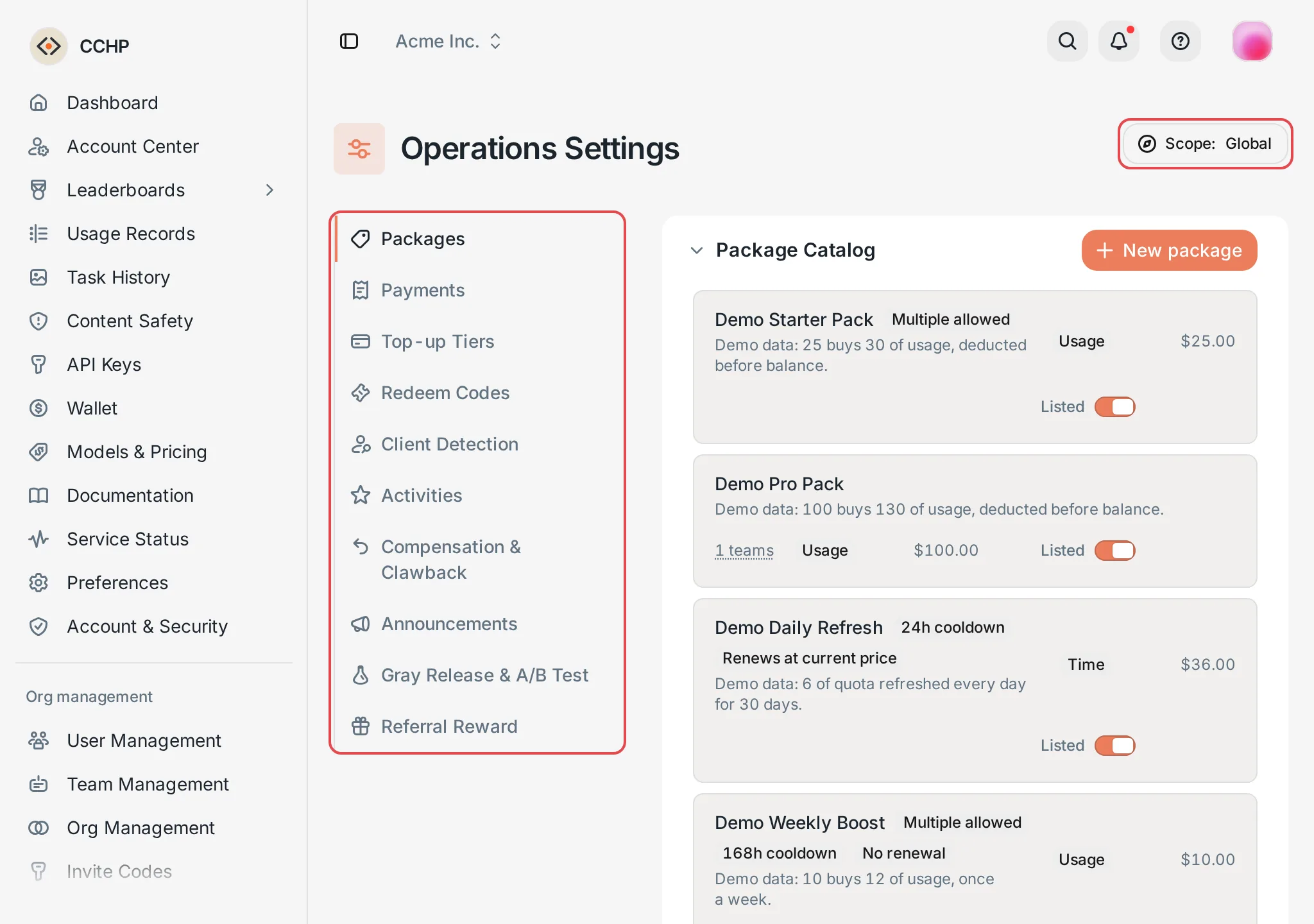 Operations Settings: the sections on the left and the scope switcher
 CCHP
CCHP
Feature flags#
Of the features in this section, only Privacy filter in Prompt safety and content moderation is controlled by a feature flag. The other features are available right after installation.
Some Beta features in System Management are also controlled by feature flags. They are off by default in a new deployment, and their tabs are hidden while they are off. These features are Privacy filter, Error rules, Model safety, and the entry for importing data from CC Hub in Database. To use one, turn on its toggle in Administration → System Management → Feature flags, and click Turn on in the confirmation dialog.
Result: Every process applies the change within 5 seconds, and the matching tab appears in System Management. If you turn the feature off later, its saved settings are kept and are used again when you turn it back on.